AI IT Helpdesk · Built for Microsoft 365

Your Helpdesk.
On Autopilot.

Give your team instant first-line IT. The agent answers questions, does the Microsoft 365 legwork, and keeps you in control of anything that matters.

helpdesk · live
I can't access my email this morning.
Your account is locked from failed sign-ins. I can reset it on your Microsoft 365 tenant.
Reset password — needs approval APPROVE
Ticket #1042 filed · SLA tracked · audit logged
$49/mo
Flat Base — Owner Free
$7
Per Employee / Month
14d
Free Trial · No Card
Sign in with Microsoft Password Resets Group & License Management Auto Ticketing SLA Tracking Knowledge Base Email-to-Ticket Approval Gates Service Health Alerts Full Audit Log Sign in with Microsoft Password Resets Group & License Management Auto Ticketing SLA Tracking Knowledge Base Email-to-Ticket Approval Gates Service Health Alerts Full Audit Log
Works With
Microsoft 365
Entra ID
Exchange Online
Microsoft Teams
SharePoint
Intune

What The
Agent Does

Think of it as a first-line IT teammate that's always on. It handles the everyday requests and the Microsoft 365 busywork, hands the tricky stuff to your people, and never touches anything sensitive without your say-so.

01 / 06

Conversational Agent

Your team just asks, the way they'd message a colleague. The agent talks them through the fix, pulls answers from your own knowledge base, and quietly clears the routine stuff before it ever reaches a person.

  • Natural-language IT support
  • Step-by-step guided fixes
  • Answers grounded in your KB
  • Escalates when it should
02 / 06

Microsoft 365 Actions

It doesn't just talk — it does the work. Unlock accounts, sort out groups and licenses, fix mailboxes, Teams and SharePoint — all carried out right inside your own Microsoft 365.

  • Temporary Access Pass / unlock
  • Group & license assignment
  • Mailbox, Teams & SharePoint
  • Onboarding & offboarding runbooks
03 / 06

Ticketing & SLA

Every request turns into a tracked ticket, prioritized and timed against your SLAs. If something's running late, it escalates and flags it — so nothing quietly falls through the cracks.

  • Auto-created, auto-prioritized
  • Configurable SLAs & business hours
  • Escalation on inactivity or breach
  • Reporting & trends
04 / 06

Your Knowledge Base

Drop in your own docs and procedures, and the agent answers from them — your policies and your way of doing things, not generic advice it pulled off the internet.

  • Upload & manage articles
  • Semantic (AI) search
  • Editable per company
  • Prompt-injection guarded
05 / 06

Email-to-Ticket

Point your support mailbox at it and incoming emails become tickets automatically. The agent replies right in the thread and handles what it can — with guardrails so it never butts into a conversation it was only CC'd on.

  • Support mailbox intake
  • Threaded auto-replies
  • To-vs-CC guardrails
  • Loop & auto-reply protection
06 / 06

Proactive Monitoring

It keeps an eye on your Microsoft 365 so you don't have to — catching outages and unused licenses before they turn into a fire drill or a wasted line on your bill.

  • M365 service-health alerts
  • Duplicate-outage deflection
  • Unused-license cost savings
  • License-exhaustion warnings

See It
In Action

A clean, fast workspace your team will actually want to use — on your own Microsoft 365, in light or dark.

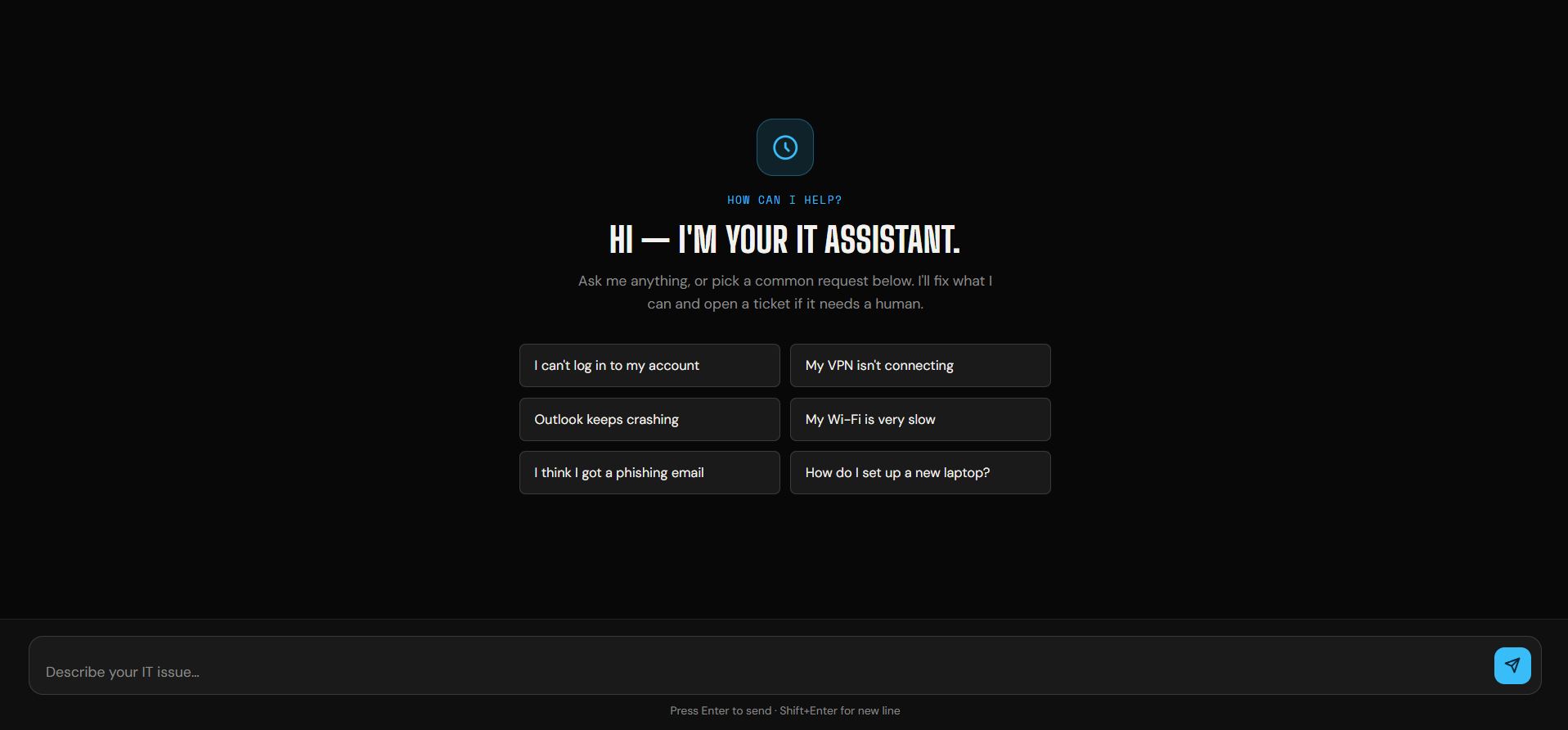
AI helpdesk chat
Conversational Agent

Employees get help in plain language, with one-click common requests.
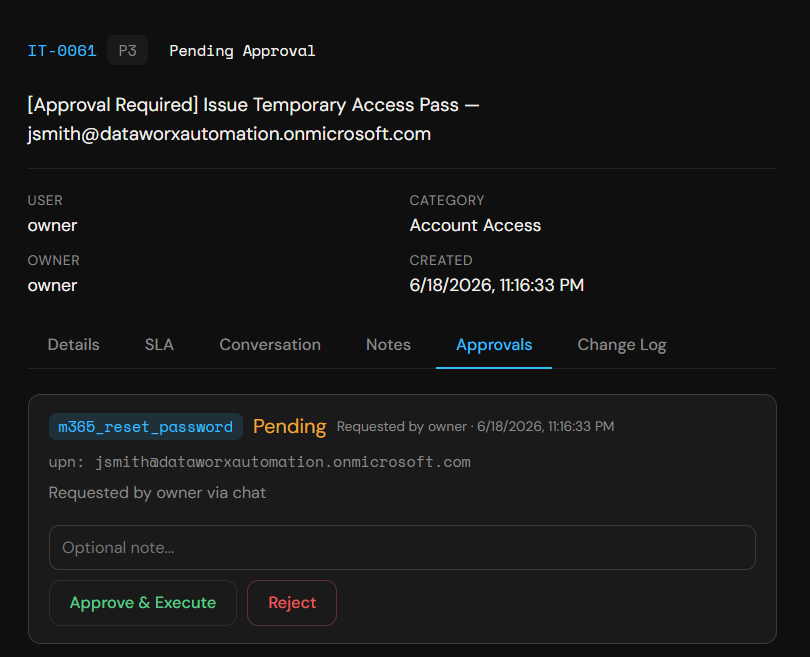
Action approval with audit
Approval Gates

Sensitive Microsoft 365 actions wait for your sign-off — every step logged.
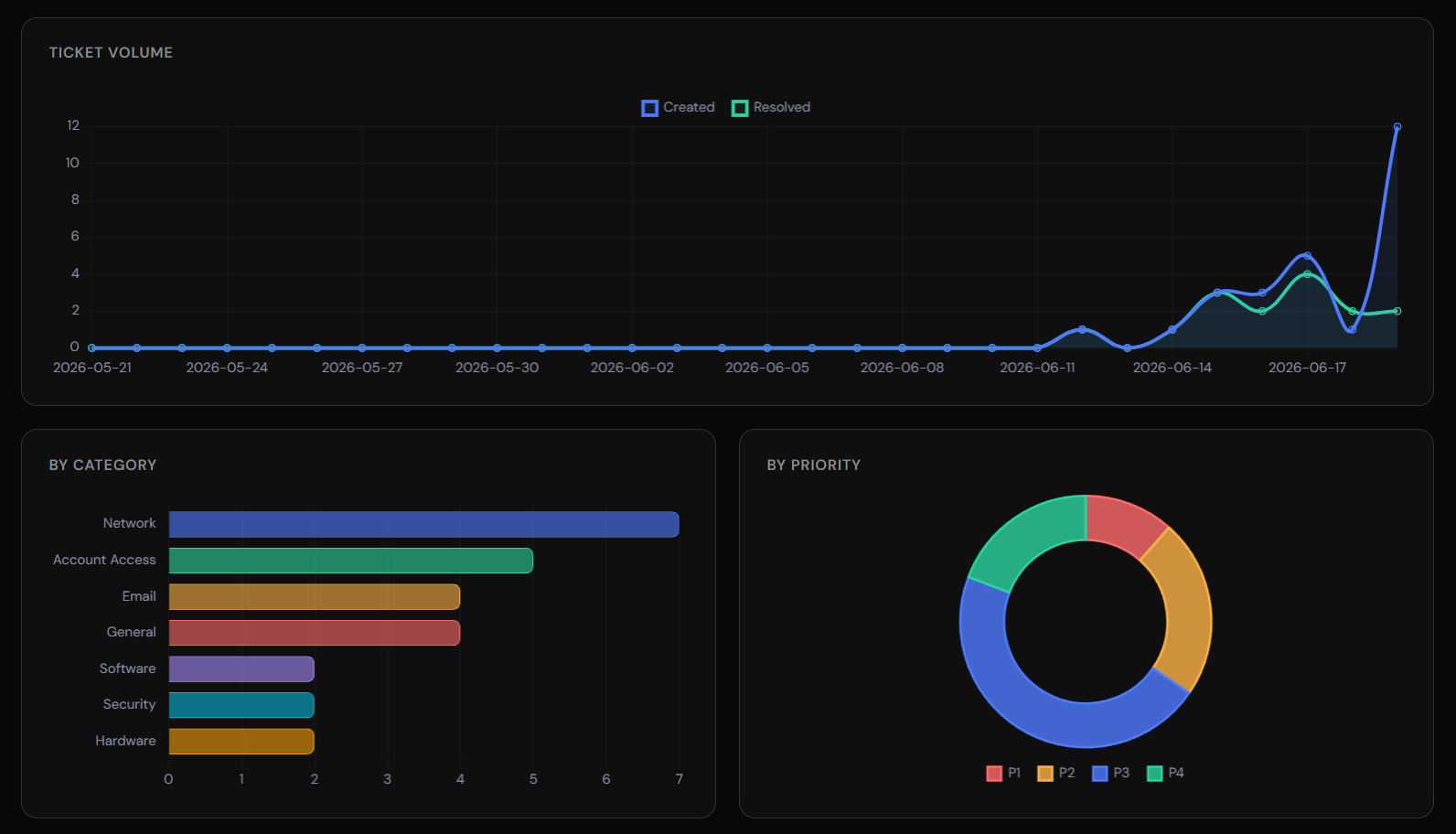
Reporting and SLA dashboard
Reporting & SLAs

Live SLA compliance, ticket trends, and technician performance.
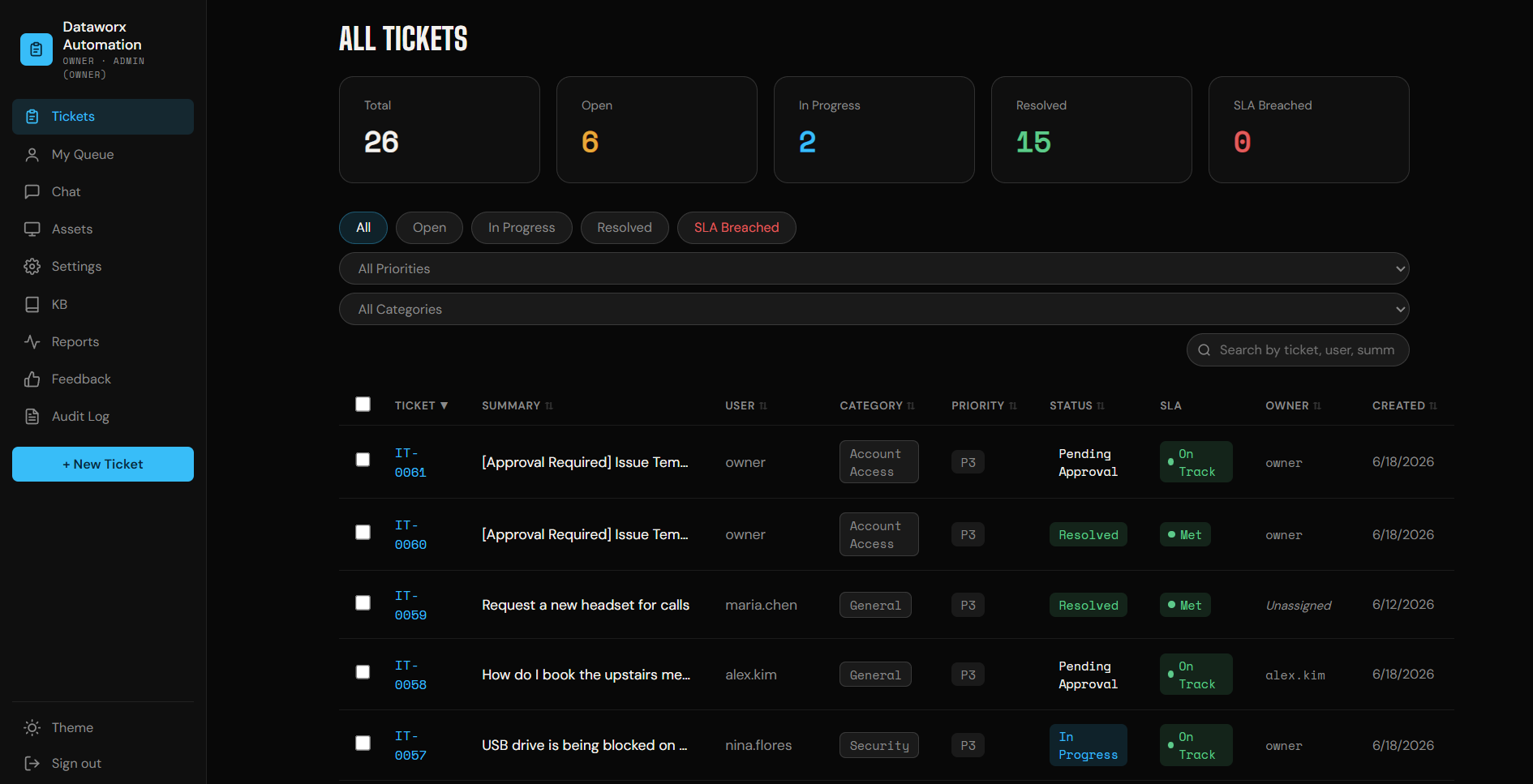
All-tickets dashboard with SLA status
One Clear Dashboard

Every request tracked, prioritized, and SLA-timed — all in one view.

Get Running in Minutes

How It Works

01

Sign Up

Start a free trial and create your workspace. No credit card, no contract.

02

Connect M365

A guided wizard (and a one-click PowerShell script) connects your own Microsoft 365 tenant. You choose exactly which permissions to grant.

03

Employees Chat

Your team signs in with Microsoft and starts getting help. The agent resolves issues and files tickets automatically.

04

You Stay In Control

Sensitive actions wait for your approval. Everything is logged. Tune SLAs, categories, and policies anytime.

Simple, Honest Pricing

One Plan. Everything In.

No tiers, no feature gates, no surprises. Pay a flat base plus a little per employee you support.

Per Supported Employee
$ 49 /mo base + $7 /employee
Owner seat free · No contract · Cancel anytime
  • Every feature included — no upsells
  • AI agent + Microsoft 365 actions
  • Ticketing, SLAs, escalation & reporting
  • Knowledge base & email-to-ticket
  • Proactive monitoring & audit log
  • Approval gates on sensitive actions
Start 14-Day Free Trial

Example: 10 employees  →  $49 base + (10 × $7) = $119/mo
Early customers keep their rate and full feature access as we grow.

Built Right

Your Tenant.
Your Data.
Your Control.

01
We Never Hold Your Keys

The agent runs against your own Microsoft 365 app registration. You grant the permissions, you can revoke them anytime — we never store your admin credentials.

02
Approval Gates

You decide which actions run automatically and which require sign-off. Sensitive changes wait for an admin's approval, every time.

03
Full Audit Trail

Every action the agent takes — and who approved it — is recorded in an immutable change log you can review and export.

04
Strict Tenant Isolation

Your data, tickets, and knowledge base are scoped to your organization alone. Nothing is ever shared across customers.

agent · live
employee>I'm locked out of my account
agent>Found your account. Issuing a Temporary Access Pass…
gate>sensitive action — approval required
admin>approved ✓
done>TAP issued · ticket IT-0042 created · logged
sla>response met · 38s

Questions,
Answered

The things IT leaders ask before they trust an agent with their Microsoft 365.

Do you need admin access to our Microsoft 365?

No — the agent runs against your own Microsoft 365 app registration. You grant exactly the permissions you want and can revoke them at any time. We never store your admin credentials, and the agent acts through your tenant, not ours.

Where does our data live, and is it secure?

Your tickets, knowledge base, and configuration are scoped to your organization alone — never shared across customers. Sensitive settings are encrypted at rest, and every action the agent takes is recorded in an immutable audit log you can review and export.

Will the agent make changes without our approval?

Only what you allow. You decide which actions run automatically and which require an admin's sign-off. Sensitive changes — password resets, group and license changes, mailbox access — wait for approval every time, and it's all logged.

How does pricing work?

A flat $49/month base plus $7 per supported employee. The owner seat is free, every feature is included, there's no contract, and you can cancel anytime. Ten employees works out to $119/month.

We already have an IT team or MSP — does this replace them?

It works alongside them. The agent handles first-line requests and routine Microsoft 365 tasks so your people focus on the work that actually needs a human — and routes everything else, with full visibility.

Your Tenant

Runs on your own Microsoft 365 app registration. Revoke access anytime.

Your Approval

Sensitive actions wait for an admin's sign-off — never automatic unless you say so.

Full Audit Trail

Every action and approval is logged in an immutable record you can export.

Early Access

Request
Early Access.

We're onboarding early customers now. Tell us a bit about your team and we'll reach out to get you set up on your own Microsoft 365.

$49/mo base + $7 / employee
Owner seat free · No contract

YOU'RE ON THE LIST — we'll email you when your early-access spot is ready.

14-day free trial · No card required

Put Your Helpdesk
On Autopilot.

Connect Microsoft 365 in minutes  ·  Cancel anytime  ·  Owner seat free